Topview
    • MCP/Skill
    • Plugin
    • API
    • Pricing
    1. Home
    2. Gaussian Splat Generator

    AI Ads

    AI Video AgentAI Ads VideoAI Product VideoAI UGC VideoURL to Video

    AI Avatar

    AI Avatar GeneratorProduct AvatarDesign My AvatarAI Lip Sync

    AI Video

    AI Video GeneratorDrama StudioAI Video Body SwapAI Video UpscalerAI Video Watermark RemoverTikTok Watermark RemoverSora Watermark RemoverSubtitle RemoverAI Motion ControlAI Lip SyncURL to Video

    AI Image

    AI Image GeneratorAI Face SwapAI Image Character SwapAI Image UpscalerAI InpaintAI Image Text EditorPhoto Angle EditorAI RelightingAI Product PhotographyAI Virtual Try-OnAI Storyboard GeneratorExtract Color PaletteImage to Prompt

    AI Voice

    VoiceoverAI Voice CloningAI Music Generator

    3D

    3D World Generator3D Shot Composer

    Use Cases

    AdvertisingAffiliate MarketingEcommerceDTC BrandsAI Live Stream

    Resources

    BlogAffiliate ProgramLearning CenterAlternativeAPI

    Company

    Topview StudioPrivacy PolicyTerms
    Topview

    © 2026 TOPVIEW PTE. LTD.

    Singapore: 20 Collyer Quay #20-03, Singapore 049319
    Los Angeles: 15970 Los Serranos CC Dr #251, Chino Hills, CA 91709

    Gaussian Splat · Generate, don't capture

    Gaussian Splat Generator

    Create explorable 3D Gaussian Splat scenes from a prompt, one image, or a short video—no LiDAR scan or multi-view capture required. Walk the result in Topview Canvas and send screenshots back to your image and video pipeline.

    01 Before

    Image → Gaussian Splat
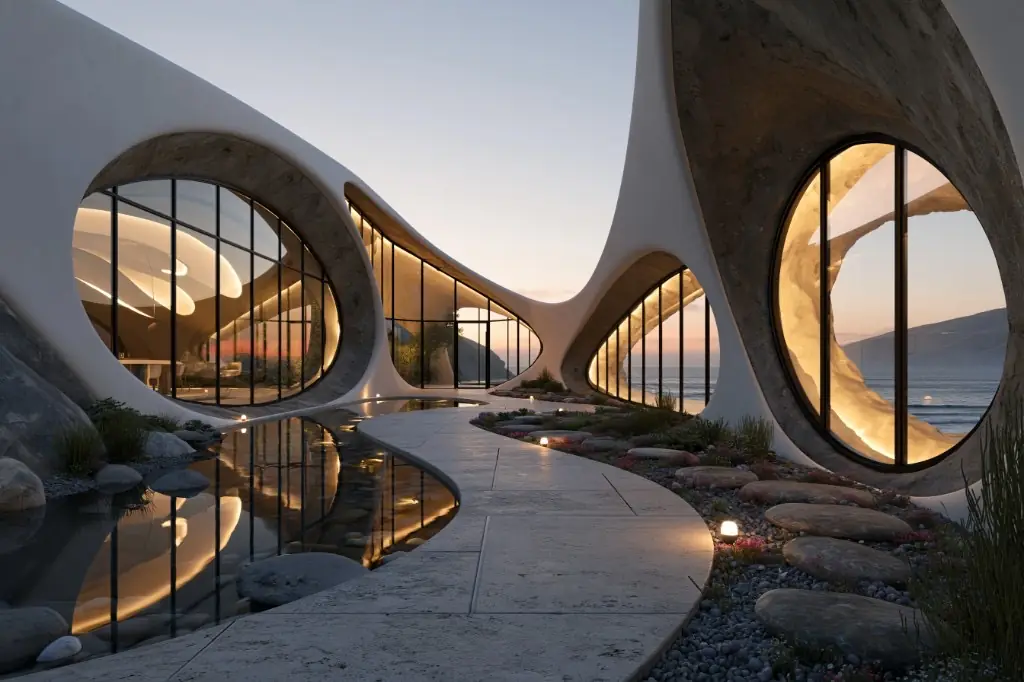
    Reference image used to generate the featured Gaussian Splat world

    02 After

    Marble 1.1 Plus

    Image1
    ·

    Optional: add one image or one video (up to 30s). Image and video cannot be used together.

    What is Gaussian Splatting?

    3D Gaussian Splatting represents a scene as many oriented ellipsoids instead of a traditional polygon mesh. That makes free camera movement through the space feel natural. On Topview, splats are generated from AI inputs rather than from scanning a real location, so you can concept environments without a capture-first workflow.

    Why generate splats instead of capturing them

    Built for creators who need navigable scenes inside a Canvas workflow, not a photogrammetry export pipeline.

    No capture hardware required

    Skip multi-view photo walks and LiDAR sessions. Start from text, one reference image, or one short video clip.

    Explorable, not a flat wrap

    Move through the splat in three dimensions with keyboard and mouse, then frame the shot you want.

    Screenshot back to Canvas

    Capture viewpoints in common aspect ratios and drop new image nodes beside your 3D World card for downstream creation.

    Same Marble-powered pipeline

    Gaussian Splat worlds on Topview use Marble models inside Canvas—one workflow for concepting and capture.

    How to generate a Gaussian Splat scene

    From prompt to explorable splat in Canvas.

    1. 01

      Open 3D World in Canvas

      From the Creation sidebar, open the 3D World dock on your Infinite Canvas.

    2. 02

      Describe or reference the scene

      Write a prompt and optionally add one image or one video. Choose Marble 1.1 or Marble 1.1 Plus, review credits, then generate.

    3. 03

      Enter the splat and capture

      Open full-screen exploration, move through the Gaussian Splat world, and screenshot the framing you need back onto the canvas.

    Capture-first splatting vs AI generation

    Both produce splats—Topview focuses on generation and Canvas integration.

    Capture-first splatting workflows

    • Typically start by photographing or scanning a real location from many angles.
    • Strong when fidelity to an existing place is the goal.
    • Often focus on reconstructing an existing place for viewing or downstream delivery.

    Topview Gaussian Splat generation

    • Starts from text, one image, or one short video—no on-site capture session.
    • Best for concept environments, branded spaces, and shot planning.
    • Explore inside Canvas and capture frames into your image and video pipeline.

    Related 3D tools on Topview

    AI 3D World Generator

    Category hub for text, image, and video to explorable worlds.

    Marble 3D Worlds in Canvas

    Create with Marble inside Topview's workflow.

    Skybox AI Alternative

    Compare 360° panoramas with explorable worlds.

    Image to 3D World vs Model

    Learn when you need a mesh vs a roamable world.

    Frequently asked questions

    Answers about Gaussian Splat generation, capture vs AI workflows, and Topview Canvas.

    No. Topview generates Gaussian Splat scenes from text, an image, or a short video. That is different from capture-first apps that require many photos or LiDAR scans of a real place.

    Capture-first workflows usually begin with a real-world scan or many photos. Topview generates splats with AI inside Canvas so you can concept spaces without an on-site capture session, then explore and screenshot results.

    No. Topview outputs explorable Gaussian Splat worlds for navigation and screenshot capture inside Canvas—not downloadable mesh files for printing or game engines.

    A text prompt, one image (PNG / JPG / WebP), or one video (MP4 / MOV / WebM up to 30 seconds). Text can combine with either media type, but image and video cannot be used together.

    It looks like a soft, detailed 3D scene you can move through freely. It is not a single 360° panorama wrapped around you—it has depth you can navigate.

    Topview offers Marble 1.1 for standard worlds and Marble 1.1 Plus for Larger World generation. Credits are shown in Canvas before you generate.

    In the full-screen viewer, set field of view and aspect ratio, then capture. PNG image nodes appear next to your 3D World card for further editing or generation.

    Yes. Panoramas with at least a 2:1 aspect ratio can serve as the sole media input without additional text, depending on your scene needs.

    No. Each generation accepts text, one image, or one short video. You can combine text with one media input, but image and video cannot be used together.

    Ready to generate your first splat scene?

    Open Topview Canvas, describe a space or add one reference, and explore the Gaussian Splat result in full screen.

    Text, image, or short video · Explore and capture in Canvas