Topview
    • MCP/Skill
    • Plugin
    • API
    • Pricing
    1. Home
    2. Video Character Swap

    AI Ads

    AI Video AgentAI Ads VideoAI Product VideoAI UGC VideoURL to Video

    AI Avatar

    AI Avatar GeneratorProduct AvatarDesign My AvatarAI Lip Sync

    AI Video

    AI Video GeneratorDrama StudioAI Video Body SwapAI Video UpscalerAI Video Watermark RemoverTikTok Watermark RemoverSora Watermark RemoverSubtitle RemoverAI Motion ControlAI Lip SyncURL to Video

    AI Image

    AI Image GeneratorAI Face SwapAI Image Character SwapAI Image UpscalerAI InpaintAI Image Text EditorPhoto Angle EditorAI RelightingAI Product PhotographyAI Virtual Try-OnAI Storyboard GeneratorExtract Color PaletteImage to Prompt

    AI Voice

    VoiceoverAI Voice CloningAI Music Generator

    3D

    3D World Generator3D Shot Composer

    Use Cases

    AdvertisingAffiliate MarketingEcommerceDTC BrandsAI Live Stream

    Resources

    BlogAffiliate ProgramLearning CenterAlternativeAPI

    Company

    Topview StudioPrivacy PolicyTerms
    Topview

    © 2026 TOPVIEW PTE. LTD.

    Singapore: 20 Collyer Quay #20-03, Singapore 049319
    Los Angeles: 15970 Los Serranos CC Dr #251, Chino Hills, CA 91709

    AI Body Swap Video Generator

    Replace the full person—not just the face.

    Start with free credits · MP4/MOV source video · JPG/PNG reference images up to 15MB
    Example
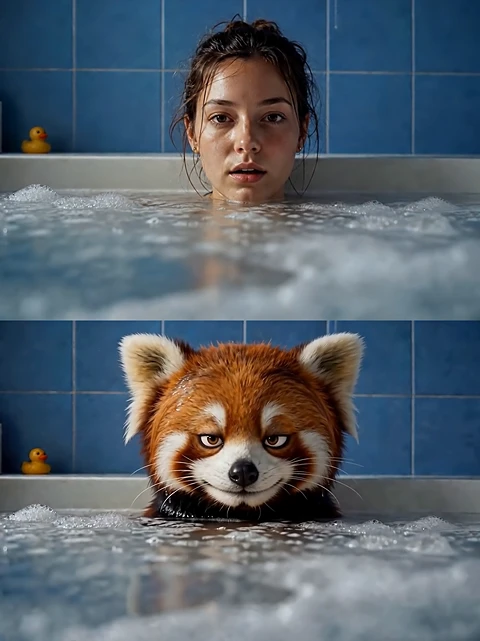
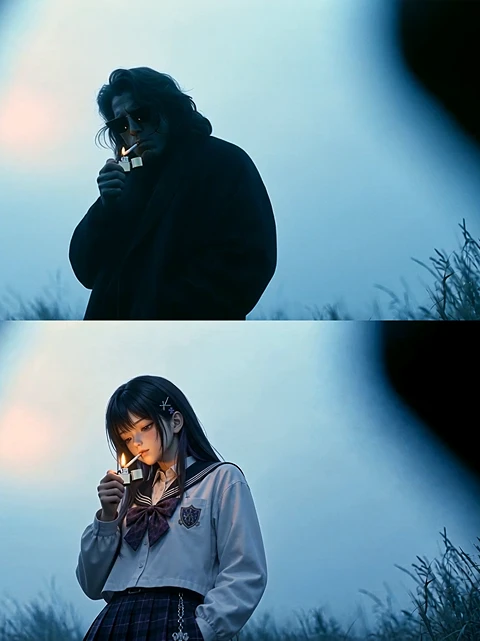
    AI body swap for character remakesExample
    Keep motion with a new characterExample

    Full body swap in a driving scene

    Replace the lead person in a source video while keeping the original motion, pose, and car interior.

    Target videoRequired
    ✦Describe the replacement requirements
    Character imagesOptional

    JPG, JPEG, or PNG · up to 15MB each · multiple images supported

    Start with free credits—credit-based access, not unlimited free generation.

    Source video: MP4 or MOV · Character images: JPG, JPEG, or PNG up to 15MB each · Private processing for your uploads

    Upload a source video and one reference image. Topview recreates the person’s full appearance while preserving the original motion, pose, expressions, camera movement and background.

    Full Body Swap

    Replace the full person, not just the face, while keeping motion and pose intact.

    Keep Motion and Scene

    Preserve original performance, timing, camera movement, and background context.

    Social and Ad Clips

    Create memes, dance videos, short-form social content, UGC ads, and localized campaigns.

    Online Body Swap Workflow

    Start online with a source video and reference image instead of rebuilding the clip in editing software.

    What Is AI Body Swap?

    AI body swap replaces an entire person in a video from a reference image while keeping the original motion, pose, expressions, and scene—unlike face swap, which only changes the face.

    Full-Person Replacement

    Replace the entire visible person, including clothing and body appearance, not just the face.

    Motion Preservation

    Keep the original performance, gestures, timing, and shot composition from the source video.

    Scene Stability

    Preserve background, camera movement, and overall framing so the result stays grounded in the original clip.

    Reference-Driven Identity

    Guide the new appearance with one or more character reference images.

    Body Swap vs Face Swap vs Character Swap

    Choose the right tool for the replacement range and intent you need.

    FeatureReplacement scopeWhat staysBest forTopview page
    AI Body SwapEntire person appearanceOriginal motion, pose, camera, and backgroundVideo person replacementAI Body Swap
    Face SwapFace onlyBody, clothing, motion, and sceneFace replacementAI Face Swap
    Image Character SwapPerson or character in a still imageStatic composition and backgroundImage character replacementAI Image Character Swap
    E-commerce Model SwapProduct modelSKU, texture, logo, and product detailEcommerce localizationE-commerce Model Swap
    Workflow

    How to Swap a Body in a Video

    Replace an entire person in three simple steps
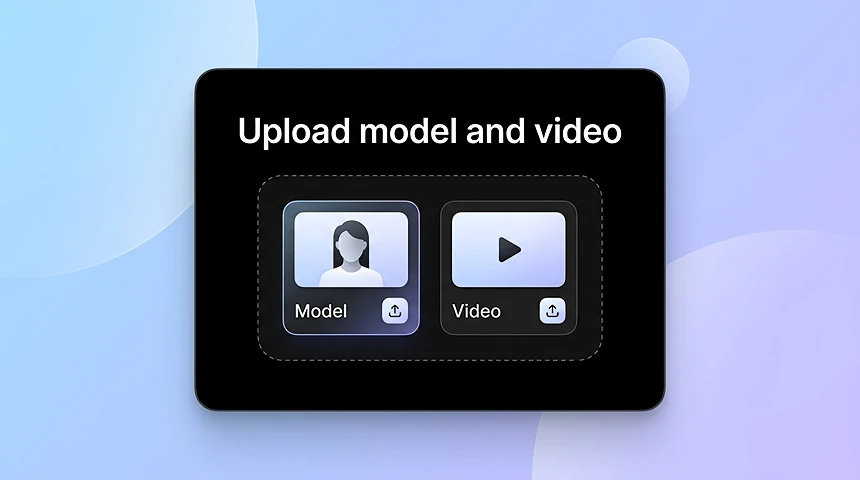
    Upload your source video
    01

    Upload your source video

    Add the target video that contains the person you want to replace.
    Add a reference image
    02

    Add a reference image

    Upload one or more images of the replacement character to guide the full-body swap.
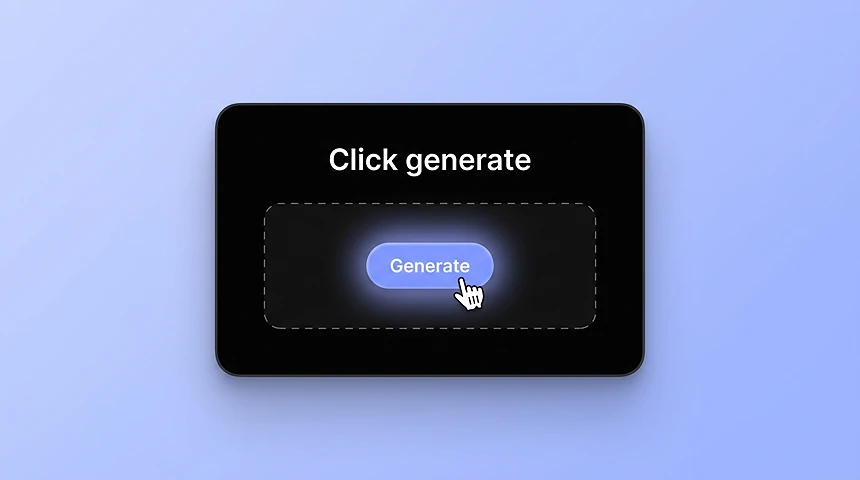
    Generate and download
    03

    Generate and download

    Start creating, review the body swap result, and export it for social, ads, or creative testing.

    Body Swap AI FAQ

    Body swap AI replaces the entire person in a video or image while keeping the original pose, motion, and scene structure. It is designed for full-person replacement, not face-only edits.

    An AI body swap video generator lets you upload a source video and a reference image, then recreate the person’s full appearance while preserving the original motion, pose, expressions, and background.

    Yes. Face swap mainly changes the face. Body swap AI replaces the full visible person, which is better for dance videos, motion clips, social videos, and full-body character edits.

    Yes. Start with a source video and a character reference image, then generate a video where the new character follows the original motion and pose.

    You can try body swap AI free with starter credits. Access is credit-based, not unlimited free generation—use the credits to test results before adding more capacity.

    Yes. You can create AI body swap videos online by uploading your source video and character reference without installing desktop editing software.

    You can make meme videos, dance clips, ad creatives, UGC-style videos, social posts, localized campaign videos, and character template videos.

    This page focuses on replacing a full person in a video. Image character swap handles still images, and ecommerce model swap is optimized for product/model localization with product-detail protection.

    You can use generated videos for ads or commercial content when you have the proper rights to the source video, character reference, products, people, and final output.

    The tool is designed for common video workflows and works with widely used upload formats such as MP4 and MOV.

    No. This is a full-person body swap: clothing, body, and identity move with the source video. If you only need to change the face, use AI Face Swap.

    They can. A clear full-body reference that is closer to the source video’s angle and lighting usually keeps clothing and identity more stable. Fast motion, occlusion, crowded shots, or a mismatched reference can still cause clothing errors, identity drift, or awkward hands. Topview does not promise perfect hands or zero drift on every clip.

    Use a sharp, full-body reference, match camera angle and lighting when you can, start with one main character, and pick a source clip with readable motion. These steps improve stability. They do not guarantee perfect hands or a result that never drifts.

    Body Swap AI Use Cases

    See how AI body swap transforms the same video by replacing the person while keeping the original motion, scene, and rhythm.

    Result

    Meme and Reaction Videos

    Turn a short clip into a body swap AI video by placing a new person or character into the same action, pose, and timing.

    Result

    Dance and Motion Clips

    Test different characters in dance clips, motion templates, fitness videos, or performance-style social content.

    Result

    Social Media Character Videos

    Create body swap video AI content for TikTok, Reels, Shorts, and creator-style videos without recording every version again.

    Result

    Ad Creative Testing

    Swap different models, creators, or audience personas into the same video concept to compare character directions for ads.

    Result

    UGC-Style Product Clips

    Replace the person in a product video while keeping the product scene and original motion.

    Result

    Localized Campaign Videos

    Adapt one video for different markets or audience groups by changing the person while keeping the same scene structure.

    Body Swap AI Video Ideas

    Ready-to-make body swap AI video concepts for trends, creators, and branded content.

    Viral Trend Remake

    Remake a trending clip with a new character while keeping the original motion and timing.

    AI Influencer Outfit Transition

    Place the same AI influencer into lifestyle clips and creator-style scenes for a more consistent video identity.

    Character Motion Remix

    Apply source-video motion to a different person, mascot, fictional character, or branded avatar.

    Replace Any Character in a Scene

    Swap the main character while keeping posture, action, camera framing, and background context.

    Short Clip Challenge Template

    Use a clean motion clip as a template, then create different body swap AI versions for posting or testing.

    Mascot or Character Performance

    Turn a mascot, illustrated character, or fictional figure into a motion video matched to a real source clip.

    Why Choose Topview for Body Swap AI?

    Motion and Expression Continuity

    Keep the original action flow, body language, gesture rhythm, and expression changes from the source performance.

    Identity and Outfit Consistency

    Use the same character reference across variations so the visual identity stays recognizable.

    Background and Camera Stability

    Preserve scene context, camera feel, and background instead of regenerating a completely new clip.

    Faster Creative Testing

    Preview a different actor, creator, model, or character before committing to another shoot or full edit.

    Tips for Better Results

    Practical guidance that improves full-body swap quality.

    Use clear, full-body references

    Prefer front-facing images where the person is fully visible, well lit, and not heavily occluded.

    Match angle and lighting when possible

    Reference images that are closer to the source video’s camera angle and lighting tend to look more natural.

    Start with a single main character

    Videos with one clear lead person usually produce cleaner replacements than crowded multi-person clips.

    Keep the source motion readable

    Sharp motion, stable framing, and fewer extreme occlusions help the model preserve pose and timing.

    Rights, Consent, and Safety

    Only upload videos and reference images you have the right to use. Get permission from people who appear in your media. Do not use body swap to impersonate, harass, defraud, or create illegal content. You are responsible for complying with local laws and platform policies.

    Explore more

    Related AI Tools

    Use the right Topview page for image character swap, face swap, or ecommerce model swap.

    AI Image Character Swap 1
    AI Image Character Swap
    AI Face Swap 1
    AI Face Swap
    AI Avatar 1
    AI Avatar 2
    AI Avatar 3
    AI Avatar 4
    AI Avatar
    Design My Avatar 1
    Design My Avatar 2
    Design My Avatar 3
    Design My Avatar 4
    Design My Avatar
    Product Avatar 1
    Product Avatar
    AI Motion Control 1
    AI Motion Control