Topview
    • MCP/Skill
    • Plugin
    • API
    • Pricing
    1. Home
    2. Video Watermark Remover

    AI Ads

    AI Video AgentAI Ads VideoAI Product VideoAI UGC VideoURL to Video

    AI Avatar

    AI Avatar GeneratorProduct AvatarDesign My AvatarAI Lip Sync

    AI Video

    AI Video GeneratorDrama StudioAI Video Body SwapAI Video UpscalerAI Video Watermark RemoverTikTok Watermark RemoverSora Watermark RemoverSubtitle RemoverAI Motion ControlAI Lip SyncURL to Video

    AI Image

    AI Image GeneratorAI Face SwapAI Image Character SwapAI Image UpscalerAI InpaintAI Image Text EditorPhoto Angle EditorAI RelightingAI Product PhotographyAI Virtual Try-OnAI Storyboard GeneratorExtract Color PaletteImage to Prompt

    AI Voice

    VoiceoverAI Voice CloningAI Music Generator

    3D

    3D World Generator3D Shot Composer

    Use Cases

    AdvertisingAffiliate MarketingEcommerceDTC BrandsAI Live Stream

    Resources

    BlogAffiliate ProgramLearning CenterAlternativeAPI

    Company

    Topview StudioPrivacy PolicyTerms
    Topview

    © 2026 TOPVIEW PTE. LTD.

    Singapore: 20 Collyer Quay #20-03, Singapore 049319
    Los Angeles: 15970 Los Serranos CC Dr #251, Chino Hills, CA 91709

    Free to Try Online

    Free AI Video Watermark Remover Online

    Remove watermarks from video online with a free trial credit. Upload a clip, choose one of three AI modes, and erase logos, moving watermarks, or burned-in text while preserving quality up to 4K.

    Clean mode
    AI video watermark remover cleaning logos and platform badges
    • Free trial credit for new users
    • 3 smart clean modes
    • Up to 4K output

    Free Video Watermark Remover Online — Try AI Removal First

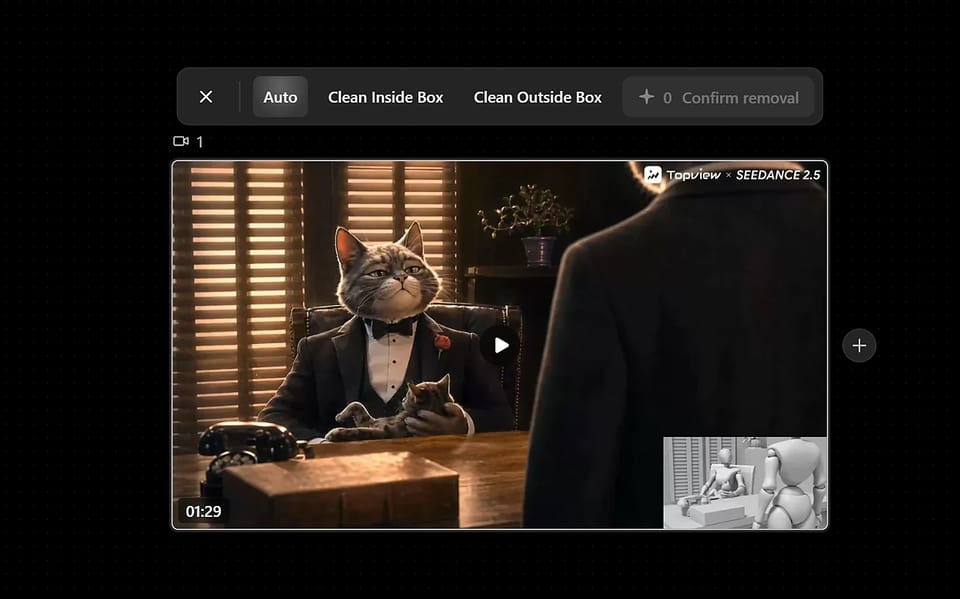
    Use free trial credits to remove a watermark from video online. Upload a clip, pick Auto / Inside Box / Outside Box, and preview clean results—logos, platform badges, and burned-in subtitles—before you spend more credits.

    Why choose

    Remove Watermarks Online Without Blur

    Start with a free trial credit. Choose from three cleanup modes, track watermarks as they move, and rebuild covered pixels with AI inpainting instead of simply blurring the area.

    Video Logo Remover

    Video Logo Remover

    Use Topview as a video logo remover: Auto finds unknown or moving logos, Inside Box targets one brand mark, and Outside Box keeps your product or face untouched. All three modes run from the same upload — no re-processing — so you can clear a logo without cropping the frame.
    Keeps Up With Watermarks That Move

    Keeps Up With Watermarks That Move

    Platforms shift their watermarks around the screen on purpose to make them harder to erase. Auto mode tracks the badge frame-by-frame with AI, so a bouncing TikTok logo or animated brand mark disappears for the whole clip — not just a few frames. For a TikTok-only badge use the TikTok watermark remover, for Sora-generated clips use the Sora watermark remover, and if the overlay is burned-in captions use the subtitle remover.

    Rebuilds Pixels Instead of Blurring Them

    Rebuilds Pixels Instead of Blurring Them

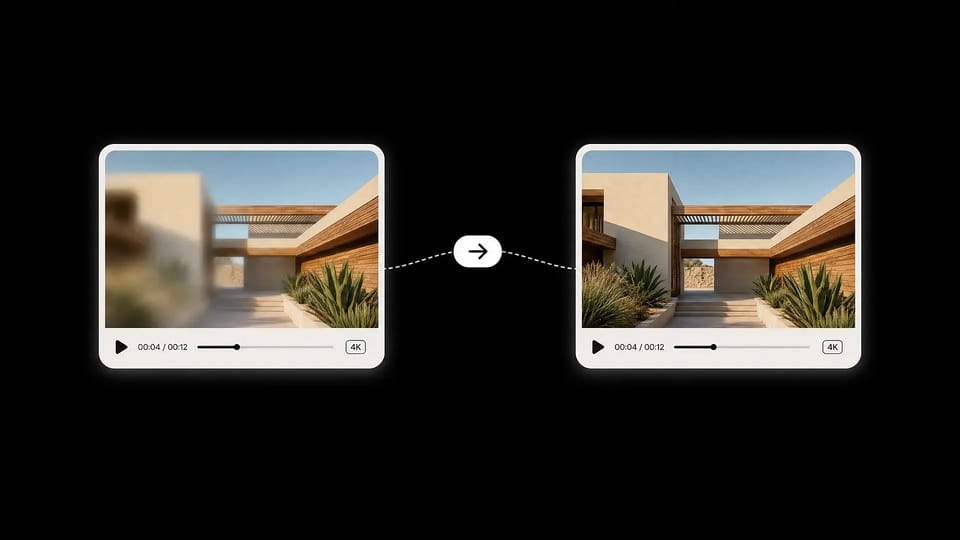
    Simple blur and crop methods can leave a soft patch or change the frame. Topview's inpainting model reconstructs the covered background by matching nearby texture, color, and motion, helping the cleaned region blend naturally at resolutions up to 4K.

    Start Free, Then Pay by the Minute

    Start Free, Then Pay by the Minute

    New users receive a free trial credit to test the video watermark remover. After the trial, each minute costs 1.8 credits — roughly $0.29 per minute on the annual plan.

    Specs at a glance

    Video Watermark Remover Specs at a Glance

    Plain-language specs — modes, pricing, limits, and what happens to your files.

    Processing modes

    Auto / Inside Box / Outside Box

    Three modes cover hands-off cleanup, precise watermark targeting, and inverse-selection subject protection — all from the same upload.

    Pricing

    Free trial + 1.8 credits / minute

    New users receive a free trial credit. Paid use costs 1.8 credits per minute, or about $0.29 per minute on the annual plan.

    Max resolution

    Up to 4K

    Supported source videos up to 3840×2160 can be processed and exported at their original resolution without a forced downscale.

    Formats

    MP4 / MOV

    Common social and editing formats are supported. MP4 is recommended for the fastest processing and broadest playback compatibility.

    AI engine

    Inpainting + Tracking

    Combines watermark detection, frame-by-frame tracking, and inpainting reconstruction so cleaned regions blend back into the original picture.

    Privacy

    Auto-deleted

    Uploaded videos are processed in your private workspace and removed from our servers after processing. We never use your content to train models.

    Who we serve

    Built for Real Watermark Removal Workflows

    From solo creators to agencies — anyone reusing existing footage benefits from a fast, reliable watermark remover that doesn't sacrifice quality.

    Served for

    Content Creators

    Re-share TikTok, Reels, and YouTube Shorts clips on other platforms without the original watermark. Auto mode handles moving badges for a clean repost in seconds.

    Served for

    Marketers & Social Teams

    Clean AI-generated video assets from Veo, Runway, or Kling before sending them to clients or pushing them to paid channels — no visible model branding in your ads.

    Served for

    E-Commerce & DTC Brands

    Reuse stock product clips and influencer UGC by stripping platform watermarks and channel logos. Clean Outside Box keeps your product centered and pristine.

    Served for

    Educators & Trainers

    Repurpose tutorial clips, lecture recordings, and sample footage for course material without distracting third-party logos or timestamps.

    Served for

    Agencies & Studios

    Process client footage at 4K, batch-clean recurring brand watermarks across an entire archive, and deliver master files free of legacy logos.

    Served for

    Remove a Logo From Video

    Remove a logo from video before it hits your timeline — channel marks, date stamps, or sample-footage labels — without a blur patch or a cropped frame. AI rebuilds the covered pixels so the clip stays usable up to 4K.

    How to Remove a Watermark From a Video Online

    Try the workflow with a free trial credit, then go from upload to a clean export in three steps.

    1. 1

      Upload your video

      Drop in any MP4 or MOV up to 4K. Your file is uploaded to a private workspace — never publicly listed, and auto-deleted after processing.

    2. 2

      Choose a cleanup mode

      Pick Auto for the entire video, Clean Inside Box to target a specific watermark area, or Clean Outside Box to protect your subject and clean everything else.

    3. 3

      Generate and download

      AI inpainting reconstructs the cleaned regions in seconds. Preview the result, then download the watermark-free video at its original resolution.

    More AI Tools

    More AI Tools

    Explore Topview's complete suite of AI tools for ads, avatars, video, image, and voice workflows.

    Subtitle Remover 1
    Subtitle Remover 2
    Subtitle Remover
    TikTok Watermark Remover 1
    TikTok Watermark Remover 2
    TikTok Watermark Remover
    Sora Watermark Remover 1
    Sora Watermark Remover 2
    Sora Watermark Remover
    AI Video Repair 1
    AI Video Repair
    AI Video Upscaler 1
    AI Video Upscaler
    AI Inpaint 1
    AI Inpaint

    Frequently Asked Questions

    What is an AI video watermark remover?
    An AI video watermark remover analyzes a video frame-by-frame, detects logos, text overlays, or platform badges, and reconstructs the covered pixels using inpainting. This helps the cleaned area blend into the scene without relying on blanket blur or cropping the frame.
    How do I remove a watermark from a video online for free?
    Start with Topview's free trial credit: upload your video, choose Auto or select the watermark area, and let AI clean the overlay across the full uploaded clip. Additional processing uses credits.
    What is the difference between the three processing modes?
    Auto scans the entire frame and removes detected watermarks — best for unknown or moving logos. Clean Inside Box targets one selected watermark area. Clean Outside Box reverses the selection: draw around what to keep, such as a product or face, and Topview cleans everything outside it.
    Can I remove TikTok watermarks?
    Yes — this page can clean a moving platform badge on a general video. For TikTok-only watermarks, usernames, and animated corner marks, use the dedicated TikTok watermark remover.
    Does it work on AI-generated videos from Veo, Kling, or Runway?
    Yes. Most AI video models brand their output with a faint logo or watermark. Topview removes them cleanly while preserving the original resolution and motion — ideal before sending AI-generated clips to a client or publishing them to paid channels.
    Can I remove Sora watermarks from AI videos?
    Yes — Auto or a box selection can clear a visible Sora mark on a mixed clip. For Sora-generated videos specifically, use the dedicated Sora watermark remover.
    Can AI remove subtitles from videos?
    Yes, when subtitles are burned into the frame. For caption-only, karaoke, or multilingual burned-in text, use the dedicated subtitle remover.
    Will removing a watermark affect video quality?
    The result depends on watermark size, motion, and background complexity. For cleaner output, use the highest-quality source file and select the smallest area that fully covers the watermark.
    Is Topview's video watermark remover free to try?
    Yes. New users receive a free trial credit to test watermark removal before paying. After the trial, each minute of cleaned video costs 1.8 credits — roughly $0.29 per minute on the annual plan.
    What video formats are supported?
    MP4 and MOV are supported out of the box, covering exports from social platforms, mobile cameras, AI generators, and most editing software. MP4 is recommended for the fastest processing time.
    Is there a maximum video length or file size?
    The page uploader accepts video files under 300MB. Processing limits can also depend on your plan and current load. For a longer video, trim or split the clip before starting watermark removal.
    Are my uploaded videos private?
    Yes. Uploads land in your private workspace, are never publicly listed, and are removed from our servers after processing. We do not use your video content to train models.
    Can I remove a watermark from a video I don't own?
    Topview is designed for content you have the rights to clean — your own AI-generated clips, your saved social posts, your licensed stock footage, or content you have explicit permission to edit. Please respect copyright and platform terms when using the tool.

    Try the Video Watermark Remover Free

    Use your free trial credit to remove a logo, moving watermark, or burned-in text online. Choose a mode, let AI rebuild the covered area, and export at up to 4K.

    Try Watermark Remover Free

    Free trial credit for new users. No install required.