Topview
    • MCP/Skill
    • Plugin
    • API
    • Pricing
    1. Home
    2. Minimax H3 Max

    AI Ads

    AI Video AgentAI Ads VideoAI Product VideoAI UGC VideoURL to Video

    AI Avatar

    AI Avatar GeneratorProduct AvatarDesign My AvatarAI Lip Sync

    AI Video

    AI Video GeneratorDrama StudioAI Video Body SwapAI Video UpscalerAI Video Watermark RemoverTikTok Watermark RemoverSora Watermark RemoverSubtitle RemoverAI Motion ControlAI Lip SyncURL to Video

    AI Image

    AI Image GeneratorAI Face SwapAI Image Character SwapAI Image UpscalerAI InpaintAI Image Text EditorPhoto Angle EditorAI RelightingAI Product PhotographyAI Virtual Try-OnAI Storyboard GeneratorExtract Color PaletteImage to Prompt

    AI Voice

    VoiceoverAI Voice CloningAI Music Generator

    3D

    3D World Generator3D Shot Composer

    Use Cases

    AdvertisingAffiliate MarketingEcommerceDTC BrandsAI Live Stream

    Resources

    BlogAffiliate ProgramLearning CenterAlternativeAPI

    Company

    Topview StudioPrivacy PolicyTerms
    Topview

    © 2026 TOPVIEW PTE. LTD.

    Singapore: 20 Collyer Quay #20-03, Singapore 049319
    Los Angeles: 15970 Los Serranos CC Dr #251, Chino Hills, CA 91709

    MiniMax H3 Max AI Video Generator

    Write a prompt or lock first and last frames to make 5–15 second clips. A 15-second video finishes in under 17 seconds. Omni-reference is not supported.

    MiniMax H3 Max · Live
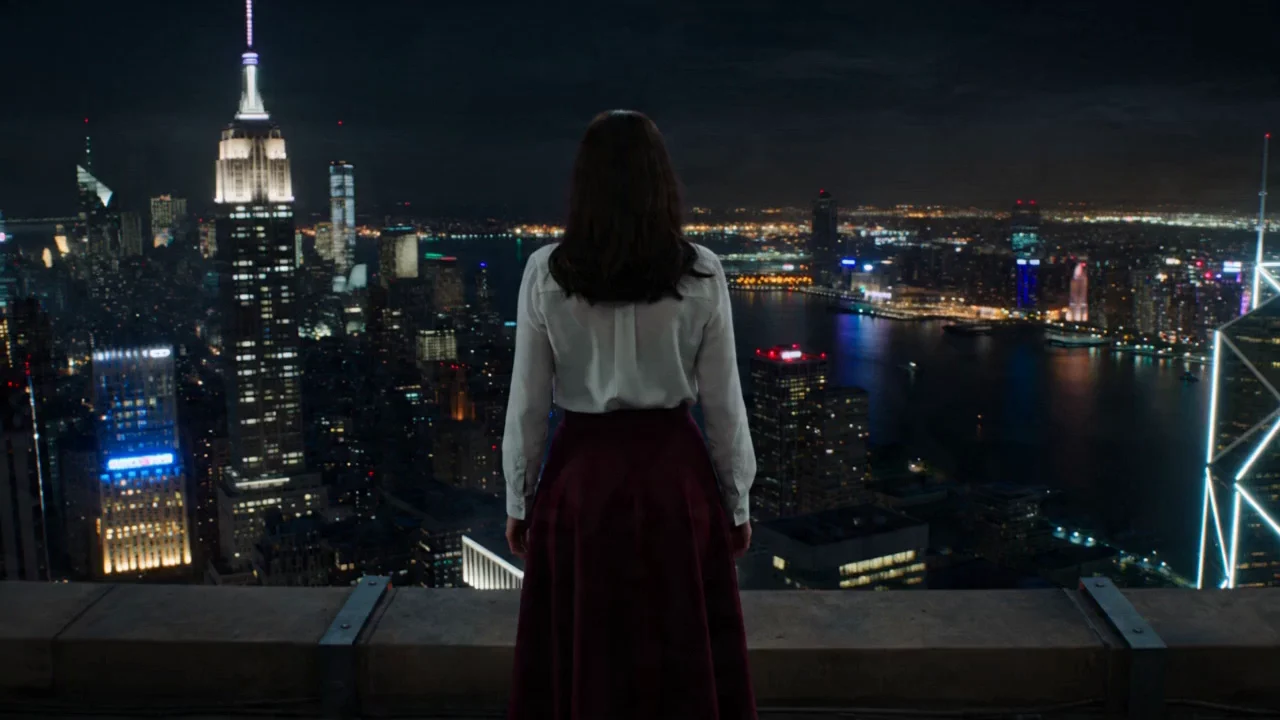
    First-frame rooftop skyline still
    @Image1
    287/3500
    Animate
    @Image1
    into a 10-second cinematic shot. Keep the young woman’s identity, white blouse, burgundy skirt, and short dark hair. Start on a still first frame, then orbit the camera as city lights bloom behind her. Soft fabric motion, precise prompt following, premium lighting, 768p.
    See MiniMax H3

    MiniMax H3 Max Use Cases

    These clips reuse current MiniMax H3 showcases to preview cinematic, action, anime, and brand-ad looks. Generate a MiniMax H3 Max clip on Topview today.

    Coffee Ad15s

    Nordvale Morning Pour

    Prompt

    A warm modern kitchen, fifteen seconds. Open on a tired young man at the counter, then cut to coffee filling a ceramic mug. Show the Nordvale Coffee Fjord Blend hero pack, beans dropping in slow motion into a grinder, a clean pour-over setup, and hot water blooming the grounds. Close on him working at a laptop, then a black pack shot: “Nordvale Coffee — Fjord Blend — Fuel your best.” Moody morning light, brown tones, shallow focus, sharp label type, tight commercial cuts.
    A warm modern kitchen, fifteen seconds. Open on a tired young man at the counter, then cut to coffee filling a ceramic mug. Show the Nordvale Coffee Fjord Blend hero pack, beans dropping in slow motion into a grinder, a clean pour-over setup, and hot water blooming the grounds. Close on him working at a laptop, then a black pack shot: “Nordvale Coffee — Fjord Blend — Fuel your best.” Moody morning light, brown tones, shallow focus, sharp label type, tight commercial cuts.
    Desert Fantasy15s

    Ronin Cat Duel

    Prompt

    Golden-hour live action on a wind-scoured dune field. A black cat in a faded cloak and leather harness advances on a line of masked fighters. Keep the camera low as it races over the sand, slips past thrown spears, draws a short katana, and wheels to meet the circle of enemies. Backlit grit, long silhouettes, shallow focus, believable fur and cloth, brisk cuts, wide-frame action.

    Golden-hour live action on a wind-scoured dune field. A black cat in a faded cloak and leather harness advances on a line of masked fighters. Keep the camera low as it races over the sand, slips past thrown spears, draws a short katana, and wheels to meet the circle of enemies. Backlit grit, long silhouettes, shallow focus, believable fur and cloth, brisk cuts, wide-frame action.
    Survival Drama15s

    Ruined-City Standoff

    Prompt

    A ruined skyline after collapse. A blonde survivor in a dark hooded jacket, bow slung across her back, watches a wounded man pick his way through broken concrete and bare towers. Start over her shoulder, hold the tense face-off, then snap into a close fight in the rubble. Cold daylight, wet stone, drifting dust, handheld framing, quiet acting, worn clothes, muted grade.

    A ruined skyline after collapse. A blonde survivor in a dark hooded jacket, bow slung across her back, watches a wounded man pick his way through broken concrete and bare towers. Start over her shoulder, hold the tense face-off, then snap into a close fight in the rubble. Cold daylight, wet stone, drifting dust, handheld framing, quiet acting, worn clothes, muted grade.

    Fast 768p Across Scenes

    H3 Max is live for text to video and first-and-last-frame work. The clips below preview the look. Generate a similar shot on Topview.

    Epic Sci-Fi Space Combat

    Sweeping space battles with complex camera paths, debris physics, and fleet-scale action — the kind of prompt-heavy shot H3 Max can generate quickly.

    Prompt

    CG style, epic sci-fi space battle. A dynamic camera flies through a dogfight between sleek triangular capital ships and starfighters above a blue planet. Features glowing blue shield deflections, orange hull explosions with realistic debris physics, and a shimmering green aurora.

    Natural Facial Performance

    Close-up emotion, skin detail, and lighting changes that reward prompt adherence — useful when you start from a still and need the face to stay consistent.

    Prompt

    Cinematic sci-fi thriller. Close-up of a sweating man staring in a dim mirror. A glowing red digital timer is embedded beneath his forehead skin, with red veins spreading as he breathes heavily. Shaking camera, dramatic flickering lights.

    Product Demo from a Still

    Image-to-video product shots: hold a bottle, dispense gel, apply product. Start from one frame and keep the product and talent locked.

    Prompt

    K-beauty commercial style. A woman holds a teal skincare bottle against a bright blue sky. Cut to a close-up of her dispensing gel onto her palm, then applying it to her cheeks to show a radiant complexion.

    Assembly and Physics

    Object assembly and shatter beats that need clean motion between a start pose and an end pose — a natural first-and-last-frame job.

    Prompt

    Stop-motion style. A pile of colorful toy bricks on a wooden table self-assembles into a detailed winged dragon with glowing yellow eyes. The dragon roars and then bursts apart, scattering back into loose blocks.

    Cinematic Aerial Motion

    Smooth drone-style camera paths for sports and city views. Write the move in text, or lock the first and last frames and let the path fill the gap.

    Prompt

    Wide-angle aerial shot. A group of skydivers in colorful suits hold hands in a circle, free-falling above endless white clouds. The camera smoothly orbits 360 degrees before they release hands and disperse.

    MiniMax H3 Max Feature Highlights

    Speed. Following. Look.

    H3 Max is live on Topview for text to video and first-and-last-frame generation. A 15-second clip finishes in under 17 seconds. Omni-reference is not supported.

    Extreme Speed

    15 Seconds in Under 17 Seconds

    On Topview, a 15-second H3 Max video finishes in under 17 seconds. Use it when you need many fast drafts, not 2K masters.

    Prompt Adherence

    Follow the Brief, Not Just the Mood

    H3 Max is positioned for tighter instruction following across camera moves, identity lock, and scene details — so text, a first frame, or a first-and-last pair stay closer to what you asked for.

    Aesthetics

    A Cleaner Commercial Finish

    The Max post-train emphasizes lighting, composition, and visual polish. That is the quality target for ads, product motion, and short cinematic shots.

    How MiniMax H3 Max Differs from H3

    Speed Variant, Not the Open H3 Base

    MiniMax H3 Max is live on Topview as the 768p speed variant of MiniMax H3. Standard H3 stays the broader model for 2K, video and audio references, open weights, and omni-reference.

    Need 2K, omni-reference, or open weights? Use MiniMax H3.

    Two Generation Types

    Text to video, or first and last frames. No omni-reference.

    What MiniMax H3 Max Is For

    Faster Commercial Drafts

    Use H3 Max when you want many on-brief drafts quickly. Use standard MiniMax H3 when you need 2K, omni-reference, video or audio references, or open weights.

    AdvertisingE-commerceGamesSocial & Motion

    Prompt Adherence

    Keep camera notes, wardrobe, product cues, and timing closer to the brief across text-to-video and first-and-last-frame drafts.

    Identity and Product Lock

    Start from a still — or a first and last frame — when the face, outfit, or pack shot has to stay consistent through the move.

    Premium Aesthetics

    Target cleaner lighting, composition, and material finish for ads, product motion, and short cinematic beats.

    Extreme Speed

    A 15-second H3 Max video finishes in under 17 seconds on Topview. Use that speed for volume drafts, not 2K masters.

    Model Profile

    MiniMax H3 Max at a Glance

    Facts below follow Topview’s live MiniMax H3 Max listing.

    Model

    MiniMax H3 Max

    Live on Topview. Model ID: minimax-h3-max

    Resolution

    480p / 768p

    Max is the 480p and 768p speed variant. For 2K, use MiniMax H3.

    Generation Types

    Text / First–Last

    Text to video and first-and-last-frame. No omni-reference.

    Duration

    5–15 Seconds

    Short clips with native audio

    Speed

    15s in under 17s

    A 15-second H3 Max video finishes in under 17 seconds on Topview.

    Audio

    Native Audio

    Video and audio are generated together. No audio-reference input on Max.

    Control

    No Omni-Reference

    Prompt adherence for text and first/last frames. Not V2V or omni-reference.

    Who It’s For

    H3 Max fits teams that need fast drafts from text or a first-and-last pair. Teams that need 2K, omni-reference, open weights, or video and audio references should use MiniMax H3.

    Performance and Paid Social Teams

    Cut many 5–15 second variants from a brief or a keyframe when you need volume more than a 2K master.

    Brand and Campaign Teams

    Explore on-brief looks quickly, then move to MiniMax H3 if the final needs 2K or richer multimodal references.

    E-commerce and Product Teams

    Animate a pack shot or lifestyle still, or bridge a first and last frame, while keeping the product readable.

    Short-Form Creators

    Turn a prompt or a first-and-last pair into a 5–15 second clip with native audio, then iterate at 768p.

    Motion and Storyboard Teams

    Use first and last frames to test a camera path or a scene transition before committing to a longer pipeline.

    Teams Comparing Max and H3

    Stay here for the 768p speed variant. Open the MiniMax H3 page for 2K, open weights, omni-reference, and video or audio reference workflows.

    How It Works

    Choose a MiniMax H3 Max generation type
    Step 1

    Choose a generation type

    Pick text to video or first and last frame. H3 Max does not take omni-reference, video references, audio references, or V2V motion transfer.

    Write a MiniMax H3 Max prompt
    Step 2

    Write the prompt and add frames

    Describe the shot. Add a first and last still for a framed transition. Choose a resolution and a 5–15 second length.

    Generate an AI video on Topview
    Step 3

    Generate in Topview

    Open Canvas with MiniMax H3 Max selected. A 15-second video finishes in under 17 seconds. Use MiniMax H3 if you need 2K or omni-reference.

    Generate MiniMax H3 Max on Topview

    H3 Max is live for fast 768p drafts from text or first and last frames. A 15-second video finishes in under 17 seconds. Open MiniMax H3 if you need 2K or omni-reference.

    See MiniMax H3

    MiniMax H3 Max live · 5–15s · Native audio

    Frequently Asked Questions

    MiniMax H3 Max is the 768p speed variant of MiniMax H3, live on Topview. Generate 5–15 second clips from text or first and last frames. A 15-second video finishes in under 17 seconds. Omni-reference is not supported.

    Third-party model and brand names are trademarks of their respective owners. Topview provides access to supported AI models through its independent platform and is not the developer of those third-party models.

    01

    Text to Video

    Describe the shot in text. H3 Max generates a 5–15 second clip with native audio. No reference image required.

    02

    First and Last Frame

    Provide a start still and an end still. The model fills the motion between them. A single still can start the shot as the first frame.

    03

    No Omni-Reference

    H3 Max does not support omni-reference, video reference, audio reference, or V2V motion transfer. Those belong to standard MiniMax H3.

    MiniMax H3 Max on Topview

    768p drafts5–15 Seconds15s in under 17sNative AudioText + First/LastLive now